Бездомные люди существуют в состоянии невидимости: они игнорируются обществом и исключены из процессов адаптации к новой реальности. У них нет накоплений
и возможностей планировать будущее, их воспринимают как нечто чуждое, что ведет к изоляции и конфликтам.
Цель проекта — создать культурный мост между обществом и бездомными.
Нейросеть, которая по сути является продуктом общества, вобравшая в себя миллионы изображений и культурных кодов, становится инструментом, способным не только документировать, но и трансформировать восприятие реальности, чтобы мы увидели бездомных пускай и в странных обстоятельствах
Даниил Зуев создал проект «Невидимые ИИ Фото», в котором использует нейросеть для трансформации восприятия бездомных людей через необычные изображения. Проект «Невидимые ИИ Фото» фокусируется на культурном мосте между обществом и бездомными, используя искусственный интеллект для изменения восприятия реальности.
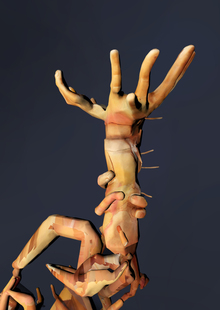
Маша Рогова создала серию работ, исследующих физическую сущность человеческого тела и его восприятие через сложные композиции из бумажных эскизов и нейросетевых скульптур. Проект включает тексты, в которых обсуждаются философские концепции, такие как «тело без органов» Делёза, в контексте телесных возможностей и взаимодействий.
We use cookies to improve the operation of the HSE website and to enhance its usability. More detailed information on the use of cookies can be fou...
Show more
Press space bar to start a drag.
When dragging you can use the arrow keys to move the item around and escape to cancel.
Some screen readers may require you to be in focus mode or to use your pass through key
Press space bar to start a drag.
When dragging you can use the arrow keys to move the item around and escape to cancel.
Some screen readers may require you to be in focus mode or to use your pass through key
Press space bar to start a drag.
When dragging you can use the arrow keys to move the item around and escape to cancel.
Some screen readers may require you to be in focus mode or to use your pass through key
Press space bar to start a drag.
When dragging you can use the arrow keys to move the item around and escape to cancel.
Some screen readers may require you to be in focus mode or to use your pass through key
Press space bar to start a drag.
When dragging you can use the arrow keys to move the item around and escape to cancel.
Some screen readers may require you to be in focus mode or to use your pass through key
Press space bar to start a drag.
When dragging you can use the arrow keys to move the item around and escape to cancel.
Some screen readers may require you to be in focus mode or to use your pass through key
Press space bar to start a drag.
When dragging you can use the arrow keys to move the item around and escape to cancel.
Some screen readers may require you to be in focus mode or to use your pass through key
Press space bar to start a drag.
When dragging you can use the arrow keys to move the item around and escape to cancel.
Some screen readers may require you to be in focus mode or to use your pass through key
Press space bar to start a drag.
When dragging you can use the arrow keys to move the item around and escape to cancel.
Some screen readers may require you to be in focus mode or to use your pass through key